
Video games are a unique kind of beast in the realm of software development—aren’t they all? you might ask, and you’d be right. From operating systems to applications written for embedded systems, and from servers and services to ERPs and CRMs, each domain has its own quirks. I won’t claim that video games belong to the toughest or weirdest domain—such a statement would be a blatant exaggeration. However, they are unique, both because of the constraints they impose on developers and the ways in which companies (and by extension, developers) get paid for them.
Mumbling
While delving into how games generate profit is irrelevant to our current journey, understanding the constraints imposed on developers by the platform, available technology, and industry standards is crucial. As briefly discussed in my previous post, Hexplore was developed in the mid-’90s, when GPUs were not as advanced or widely accessible to home users, Pentium processors had just started dominating the market over older Intel/AMD/Cyrix models, CD-ROMs were relatively new, and hard drives were small and slow.
| Component | Requirement |
|---|---|
| CPU | Pentium 100MHz or 100% compatible |
| RAM | 16 MB |
| CD-ROM | 4x speed (600kb/s) |
| Sound | Sound Blaster 16-bit or compatible |
| GPU | SVGA Video Card |
| OS | Windows 95/98 |
These are the system requirements for Hexplore. While they may seem irrelevant at first glance, they serve as a constant reminder to stop questioning why developers made certain decisions—this game is over a quarter of a century old. It’s important to note that a Pentium running at 100MHz could execute at most two instructions per cycle[^1], but most of the time, it would execute just one. Additionally, some instructions take more than one cycle to complete, and access to EDO RAM was slow. When combined with the fact that Pentiums lacked many of the features modern processors boast (e.g., out-of-order execution, speculative execution, and cache prefetching), execution speed becomes a critical factor. Simply put, 100MHz means the processor could perform 108 instruction cycles per second—meaning each instruction cycle took roughly 10ns.
The Pentium was a single-core, single-thread CPU, meaning only one process could execute at any given time. Windows 95, however, was a true multitasking OS — it employed preemptive multitasking to allow multiple processes to appear to run simultaneously. This is seamless to the user, as time slices are calculated by the scheduler to meet the needs of each process. However, this adds extra overhead that developers had to take into account. Their applications had to compete with others for resources, so they needed to execute tasks efficiently to prevent users from experiencing lag or slow loading.
Moreover, while the 10GB barrier was broken in 1997, a typical hard drive had a capacity of around 4GB—which had to store the OS, other applications, documents, and more. As a result, most games of the era offered players the option to perform a minimal installation, copying only essential files to the hard drive while loading the rest from the CD-ROM as needed. This extended loading times, but given the hardware limitations, it was the preferable option for most users. For context, a 1x CD-ROM speed was equivalent to 150kb/s—Hexplore required a 4x CD-ROM (or faster). A file from the game’s first level, for example, is 2.1MB, so in an ideal scenario, it would take around 4 seconds to load.
Many of us remember placing the mouse cursor at the tip of a progress bar, anxiously wondering if an installation had frozen—yes, loading times in the ’90s were often a painful experience. This is why developers employed clever techniques to reduce overhead, improve speed and responsiveness, and squeeze the best performance possible out of the hardware we had at the time.
First steps
When we last left our adventurer, he was discussing the game’s texts. While I was correct in assuming that the game’s strings are stored in the Gbtxt.st1 file, it took me quite some time to understand not only the file’s structure but also how Hexplore uses it.
The first and most logical step was to search the file for a well-known string, like a game message or the name of an enemy. If you haven’t met him yet, here’s Glore:
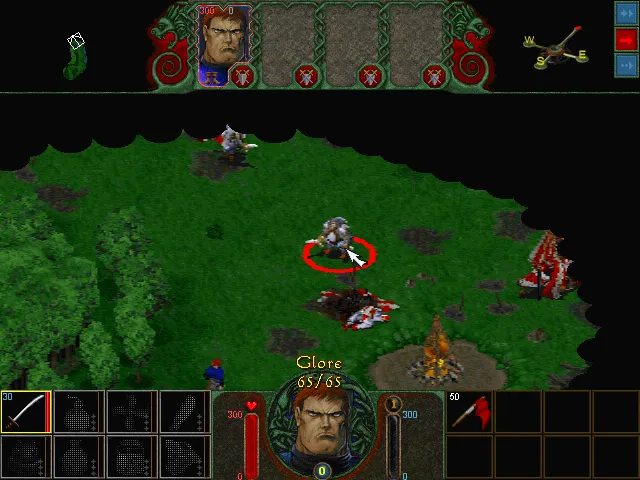
Glores are described as monstrous scum and emit a vile laughter when you enter their line of sight and they decide to attack. While there are numerous references to glores in the game (hint: 18), I wasn’t able to find any in the data file. The next logical step was to open the file with a hex editor and check for anything legible inside. However, I found no clues, as the file appeared entirely composed of garbage. Declaring it a dead end, I returned to Ghidra to continue reverse engineering the game.
Searching for .st1 in the Defined Strings window revealed one result: txt.st1. The fact that Gb is missing is pretty strange, hinting that we’re in for a surprise. This string is referenced only twice in the entire program (at least, that’s what Ghidra detected), so finding where the string loading and decrypting functionality occurs should be straightforward.
Upon visiting the first location, we’re greeted by a long function. The first thing it does? It calls sprintf to generate a file path using the format: %s\%s%s. The first argument is "common"—there’s our directory. The third argument is the txt.st1 string. Logically, the middle argument should be Gb… but how?
Let’s make a deviation…
Detecting the Game’s Language
If we backtrack a bit, we’ll notice a function call in WinMain, just before the game’s main loop begins. This function is called with a reference to a structure and, I guess, it performs some kind of initialization before allowing the game to proceed to the main loop. The function starts with a call to GetCurrentDirectoryA—which is a curious choice. It stores the current directory in the aforementioned structure and then creates the following string:
sprintf(buffer, "%s\\%s\\??%s", game->gameDir, "common", "txt.st1");It then immediately calls FindFirstFileA:
WIN32_FIND_DATAA findData;
HANDLE hFindFile = FindFirstFileA(buffer, &findData);
if (hFindFile != INVALID_HANDLE_VALUE) {
  // We found something:
  gameLanguage[0] = findData.cFileName[0];
  gameLanguage[1] = findData.cFileName[1];
  gameLanguage[2] = '\0';
}
So, if the file were named Gntxt.st1, would the game’s language be set to Gn (hint: German)? Oh yes, it would!
There’s little point in debating whether this decision was good or bad. It’s certainly an odd one, considering the developers could have chosen a more straightforward way to detect the game’s language. For example, they could have written a value to the Windows Registry during the game’s installation.
When the game starts, the memory location where the language will eventually be stored contains the string XX, which is then updated by this method. However, another curious decision stands out: the use of GetCurrentDirectoryA.
According to Microsoft’s documentation, this function retrieves the current directory for the current process. But what exactly is the current directory? While not explicitly explained in the documentation, it refers to the directory you’re currently in when launching the application. For instance, if the game is installed in C:\Hexplore\ and you open a command prompt at C:\ and run .\Hexplore\hexplore.exe, guess what? GetCurrentDirectoryA will return C:\. You see where this is going?
If we try this little experiment, we’ll notice that Hexplore will fail to start, displaying a message box that reads FILE ERROR: 5 along with the problematic file path (in our case, C:\common\XXtxt.st1).
A better approach here would be to use GetModuleFileNameA, which retrieves the actual path of the executable. With a bit of string manipulation, the correct path could be derived, and small bugs like this wouldn’t exist (Note to future self: make it fail-proof when you start implementing it).
Back to String Finding
Right after setting the game’s language, Hexplore calls the long function that greeted us earlier. As we discussed, it crafts the proper path to the file and stores it in a buffer. It then proceeds to check if the file exists and loads it into memory.
void __cdecl LoadStringsFromDisk(LPCSTR fileName,char *data,int shouldDecryptStrings);This function does the following:
- Retrieves a handle for the file.
- Retrieves the file’s size.
- Allocates memory to store the file.
- Reads the file.
- Closes the file.
All steps use the Windows API to perform file operations.
Subsequently, if the shouldDecryptStrings parameter is not equal to 0, it proceeds with decrypting the data in place.
Hexplore has an intricate and interesting way of accessing files, which will be analyzed in another post once I have completely figured it out. For the time being, what is important is to see how the decryption takes place.
Decryption
// Simplified version of loading the data from disk:
long size = GetFileSize(handle);
char* data = (char*)malloc(size);
ReadData(handle, data, size);

if (shouldDecryptStrings != 0) {
  char key = 0x37; // Set the initial key
  int i = 0; // Set the counter
  while (i < size) { // While there is data in the buffer
    char temp = buffer[i] ^ key; // XOR the current character with the key
    key = key + buffer[i] + 0x33; // Add 0x33, the current character, and the key to key
    buffer[i] = temp; // Store the decrypted character
    i++; // Increment the counter
  }
}
Since I had never encountered this type of encryption before, I did some research and found that it resembles a Stream Cipher.
While I’m no expert on encryption, I’d like to share a few observations:
- This encryption implementation serves a dual purpose: on one hand, it adds a layer of complexity to the data, making it harder for players to modify the game or inadvertently break it while trying to mod it. On the other hand, it helps protect the game’s integrity, ensuring that players experience the game as intended.
- The decryption process is quite efficient, as it performs a per-byte XOR operation, which is lightweight (hint: takes 1 instruction cycle on the Pentium). As mentioned earlier, in the realm of video games, speed and efficiency are crucial to prevent choppy gameplay or long loading times.
- The use of a dynamic key per byte introduces an additional layer of obfuscation that makes simple attacks more challenging. This prevents easy key prediction and makes brute-force attempts more difficult.
- While this method might seem simplistic by today’s standards, it highlights the creative solutions game developers employed in the ’90s to protect their games. Even simple encryption methods like this could deter casual modding and hacking efforts.
It’s Decrypted, but It Still Makes No Sense
After writing some quick and dirty code to decrypt the file and store it locally in its decrypted form, I opened it again with a hex editor to investigate its contents. While I was able to find Glore and all of the strings used in the game, I was puzzled by the file’s structure. It seems to have a header and contains much more data than just the game’s strings. Since I was not able to find any information on the internet regarding this file format, I believe it is probably a proprietary format used exclusively for this game. Heliovisions released six games, and of those, only two were released for Windows. It is highly unlikely that they used this format in another game, and researching further into this matter seems futile. While one approach would be to look up the game’s credits and search for other games created by Hexplore’s development team, it’s uncertain that I would find anything. Thus…
Back at Ghidra. Right after the call to LoadStringsFromDisk, there’s another call whose first argument is a pointer to the unencrypted data. Interesting… Let’s follow it to see where it leads us.
FUN_004160a0
void __cdecl FUN_004160a0(char *decryptedData,uint param_2,int *param_3)First of all, the function performs a simple check to determine whether the pointer that contains the decrypted data is allocated. Subsequently, it checks if its first integer element equals 0x54585423. Since X86 is little-endian, this corresponds to 0x42545854, or BTXT if translated to ASCII. Hey! I think we’ve found a header, since this seems like a magic number!
The next check is against the 3rd integer in the decrypted data (0x08) and ensures that it is not equal to 0. Definitely a header. Finally, it checks if the third parameter isn’t NULL and that the second parameter is less than 100000000.
; First check: Is the pointer allocated?
MOV ESI, dword ptr [ESP + decryptedData]
TEST ESI, ESI
JZ return

; Second check: Is the first four bytes of the header valid?
MOV EAX, dword ptr [ESI]
CMP EAX, 0x54585442
JNZ return

; Third check: Is the third element of the header not zero?
MOV EAX, dword ptr [ESI + 0x08]
TEST EAX, EAX
JZ return

; Fourth check: Is the third parameter of the function allocated?
MOV ECX, dword ptr [ESP + param_3]
TEST ECX, ECX
JZ return

; Fifth check: Is the second parameter less than 100000000?
MOV EDX, dword ptr [ESP + param_2]
CMP EDX, 0x5f5e0ff
JA return
With these clues so far, we can deduce that the file does have a header, so we will continue investigating the function to determine how long the header is, from which fields it is composed, and what values they have. Moving on, the function performs some initialization of param_3:
MOV dword ptr [ECX],0x0
MOV dword ptr [ECX + 0x4],0x0
MOV dword ptr [ECX + 0x8],0xffffffff
It seems that param_3 is a structure which might look like the following:
typedef struct {
  void* unknown1;
  void* unknown2;
  int unknown3;
} UnknownStruct;
Subsequently, the function runs the following code:
; Load into EDI the fourth field of the header
MOV EDI, dword ptr [ESI + 0xc]
; Load into EBP the third field of the header
MOV EBP, dword ptr [ESI + 0x8]
; Add the base address of the decryptedData pointer into EDI
; Now EDI points to another address, which means that the fourth
; field of the header is an address within the file
ADD EDI, ESI
Alrighty! Back to the hex editor! The file’s value at position 0xC is 0x0000001C. This means that now, EDI points to wherever the pointer is located in memory, plus 1C (or 28 in decimal) bytes ahead of the pointer’s start. Thus, this strengthens our belief that this field in the header contains an address inside the file where something begins. The value at 1C is 0x00000000, so we don’t have anything solid yet. Let’s continue:
; Load the third field of the header into EBX
MOV EBX, EBP
; Divide EBX by two
SHR EBX, 1
; Load into EAX the contents of the address pointed to by
; EDI (currently at 1C) plus EBP times four.
LEA EAX, [EDI + EBP * 0x4]
EBP stores the data found in the third field of the header. By examining the file, we’ll notice that this value is 0x52C (or 1324 in decimal). Subsequently, EBX stores its half, which is 0x296 (or 662 in decimal). Finally, EAX is loaded with the value found at the address pointed to by EDI (wherever the pointer lies, plus 0x1C) plus 0x14B0, resulting in 0x14CC.
Conveniently, the fifth field of the header contains the value 0x14CC. Therefore, this must be another address, either the beginning of a section or the end of a section, since the file contains much more data beyond that address. As this starts to look like a pattern, I had to investigate the values of what I thought was the header.
typedef struct {
  int magic;  // Always 'BTXT'
  int unknown1; // 0x100
  int unknown2; // 0x52c
  int unknown3; // 0x1c
  int unknown4; // 0x14cc
  int unknown5; // 0x52dc
  int unknown6; // 0x297c
} st1header;
I first went to 0x14CC, which is a strong lead since it appears both in the file and in the calculation in the code. The value at that position is 0x52DC… Wait, what? A quick jump to 0x52DC reveals the value 0x72745300. However, I can see in my hex editor that the string Strength: appears, followed by a NUL character. I jumped back to 0x14D0, which contained the value 0x52DD where the Strength: string begins, and I wondered, does the pattern continue?
0x14D4contains the value0x52E7=> Mechanism followed by a NUL character.0x14D8contains the value0x52F1=> Incantation followed by a NUL character.
The last string can be found at address 0x15898, so by looking for that value in the file, we’d probably find where it is stored. The search reveals that this is found at address 0x2978, which is strangely close to the value stored in the unknown6 field in the header. As such, we can deduce that:
- At
0x001C, an unknown section starts. - At
0x14CC, a section that contains addresses of the real strings starts. - At
0x297C, another unknown section starts. - At
0x52DC, the strings section starts.
typedef struct {
  int magic;  // Always 'BTXT'
  int unknown1; // 0x100
  int unknown2; // 0x52c
  int addrUnknown1; // 0x1c
  int addrStringLocationStart;
  int addrStringStart; // 0x52dc
  int addrUnknown2; // 0x297c
} st1header;
It’s four in the morning, and I think it’s time for me to sleep. I’m probably killing off the few healthy brain cells I have left, trying to figure out how this thing works. #GiveMeMoreAssembly.
; Compare EDI (ptr + 0x1C) with EAX (ptr + 0x14CC)
CMP EDI, EAX
; Load into EBX the value stored at EDI (ptr + 0x1C)
; plus EBX multiplied by 4 (to get the correct offset)
LEA EBX, [EDI + EBX * 0x4]
JNC return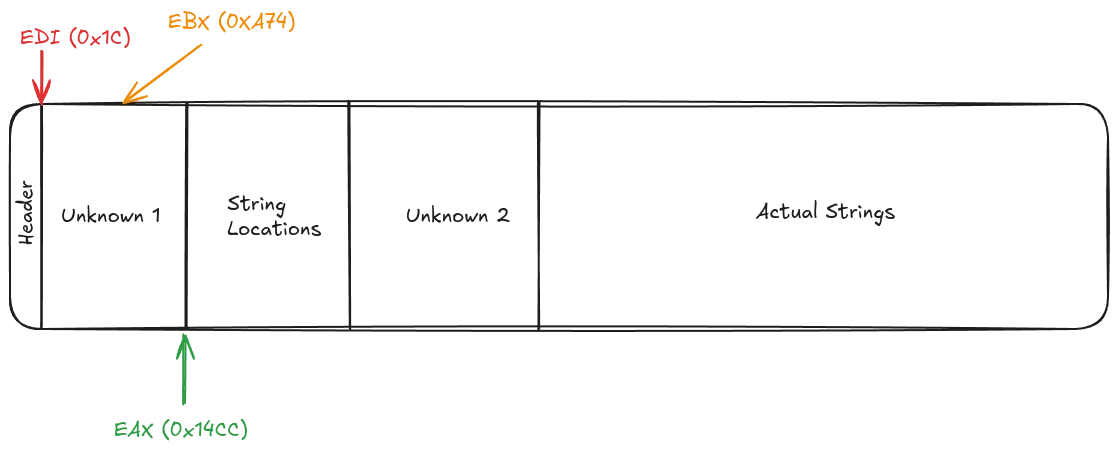
LAB_0041610a:
; Load the contents pointed to by EBX into ECX
MOV ECX, dword ptr [EBX]
; Compare the value in ECX with EDX (param_2)
CMP ECX, EDX
; If they are equal, jump to LAB_0041612d
JZ LAB_0041612d
JLE LAB_00416116
; Load EBX into EAX for further processing
MOV EAX, EBX
JMP LAB_00416119
Now we are getting somewhere! First and foremost, we identified that param_2 is used for matching something from the Unknown 1 area, so it must be important for the game and will most likely give us more answers. Instead of continuing to read assembly, we’ll perform some speculative execution and assume that we have a match; thus, we are going to jump to LAB_0041612d.
The we have a match code is pretty straightforward and reveals even more information about the structure of the file and the algorithm that is used to search for a string inside the strings file. Firstly, it uses the address of EBP, which is the address of the matching element, and adds to it the third field of the structure multiplied by 4, in order to access the String Locations Area. From that point, it reads the value at the given location and resolves it to find the string, setting the pointer — the first field of the structure found in param_3 — to the actual string. Subsequently, it finds the relevant position in the Unknown 2 Area and sets the next two fields of the structure to the values found in the file.
As such, we can make the following observations:
- The Unknown 1 Area contains the String IDs sorted in ascending order; thus,
param_2is the ID of the string we want to retrieve. - The third parameter of the function is a structure that contains a pointer to the actual string and extra data obtained from the file. The Unknown 2 Area contains this extra data.
- The header of the file and the structure containing the information we want look like the following:
typedef struct {
  int magic;      // Always 'BTXT'
  int unknown;    // 0x100, probably version or other flags
  int nEntries;   // Number of strings in the file
  int addrIdx;    // Address of the index section
  int addrStrLoc; // Address of the strings location section
  int addrStrSec; // Address of the strings section
  int addrExtra;  // Address of extra data section
} StringTableHeader;

typedef struct {
  char* string;   // Pointer to the actual string
  int unknown1;   // Unknown extra data
  int unknown2;   // Unknown extra data
} StringEntry;
Verifying Our Claims
Let’s say that we are looking for the string with ID = 45141. The game will perform a binary search (which is fast) to determine where this value is located in the Index Section. When it does, it will add 0x14B0 (or the number of entries * 4) to move the the Strings Location Section in order to find where the string is located in the file. It will extract the string (and the extra data found at 0x297C plus the position of the index in the Index Section) and return a StringEntry structure:
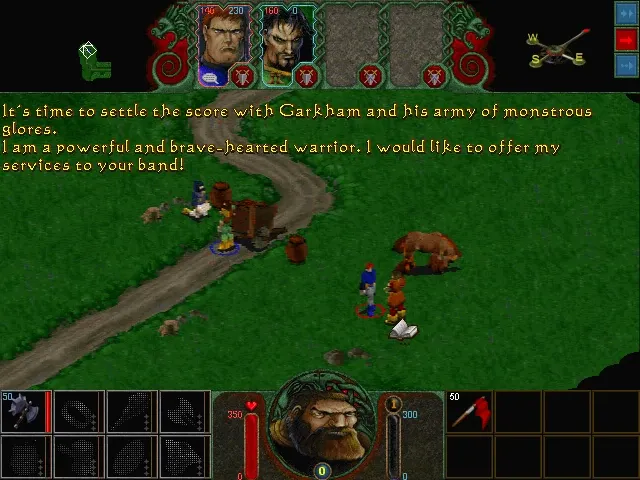
It’s time to settle the score with Garkham and his army of monstrous glores. I am a powerful and brave-hearted warrior. I would like to offer my services to your band!
The most interesting part of this approach is that when Hexplore requires loading a string for displaying, it only needs 12 bytes of memory since it does not copy the string to the StringEntry structure but uses a reference to its location in the decryptedData! Talk about optimizations and resource conservation!
Armed with all this information, I can start working on something solid — a library to read and write the String Table (I guess that st1 means String Table version 1), which can be used both in the development of a tool (for modding) and for the recreation of the engine, should I ever decide to pursue it.
What’s Next
One milestone down, many more to go! There are many more file types to understand, document, and manipulate, among which are:
sb0files, which contain textures.vb1files, which contain 3D assets.binfiles, which contain information about levels, maps, heroes, and other game-related data.sbkfiles, which contain music and sound samples.savfiles, which contain save data.
However, things are going to get serious since I’ll have to reverse engineer the graphics engine, the sound engine, and the game engine to understand these data files. Maybe not in their entirety, but I’ll need to have a very clear picture of how they work and how they use the files and the data that resides in them to perform the same work as I did here.
I am not entirely sure what I will settle on; for the time being, I’m just moving around, reverse engineering here and there, and documenting things. Maybe I’ll have something solid the next time we speak, maybe I won’t. However, one thing is certain: The process is underway.

About Alexandros Koutroulis
Senior Software Engineer with over 10 years of professional experience and nearly 30 years of coding experience. Specializing in backend engineering, debugging, reverse engineering, and PaaS & Web Development. Engineering Manager of the eFront's Engineering Team, sharing technical insights from the trenches.